Skip to content
Menu
Netzwerk Fotografie Netzwerk Fotografie
  • Über uns
    • Für User: Mitgliedschaften
    • Interessiert an einer Zusammenarbeit?
  • Community
  • Testberichte
  • Videos
  • Marktplatz
  • Newsletter
  • Shop
    • Warenkorb
    • Kasse
    • Mein Konto
    • AGB
    • Widerrufsrecht
    • Zahlung und Versand
0
Netzwerk Fotografie Netzwerk Fotografie

Olis Tips on Color Management #9

By Anja Anton-Hoenen on 19. Oktober 20178. November 2017

Why color calibration of cameras is essential

Olis Tips on Color Management

Datacolor expert Oliver Mews gives tips on color management.

Today: Why color calibration of cameras is essential.

Colors in a photograph don’t necessarily coincide with colorful photos. When photographing under conditions with mixed lights, the results strikingly reveal a fact everybody is probably aware of anyway: each camera interprets colors differently, although the light conditions were identical during capture. One preview on a camera display shows colors with a slight red cast, another preview display seems to show a cold, blue cast. The camera’s automation is not the only factor responsible for this predicament.

A camera’s or RAW converting software’s automatic white balance refers to the brightest pixels in a photograph. These pixels work as a reference point for neutral reflections of the existing light. Oftentimes, this process works fine. As soon as photos are taken from different angles or with different cameras however, misinterpretations in terms of white balance become extremely obvious. Those shooting JPG and choosing to reply on automatic white balance, have to deal with differences in displays of color between their photos.

There is hardly a way to correct this discrepancy and a correction automatically results in significant loss of image quality. RAW converters don’t even consider using such hardly color-neutral pixels as a reference for white balancing, as the software allows for a manual definition of a neutral gray reference with just a click during post-processing. Thus, it’s important to always have a gray card at the ready. Watch out however, when dealing with photos capturing colorful lighting moods, such as sunsets. These kinds of pictures always require manual adjustments in your RAW converting software.
Olis Tips on Color Management #9 Olis Tips on Color Management #9
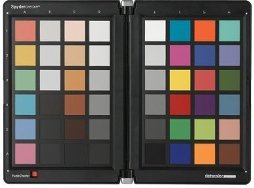
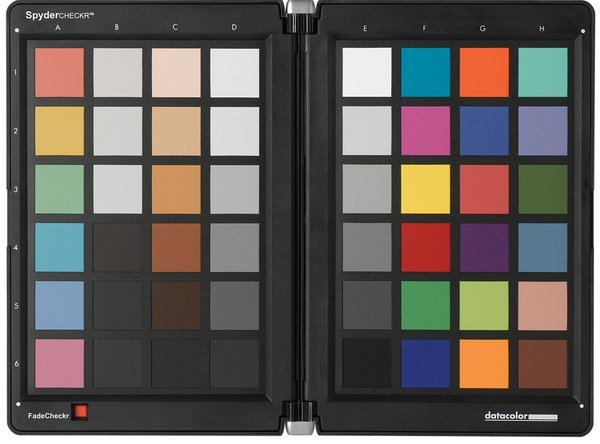
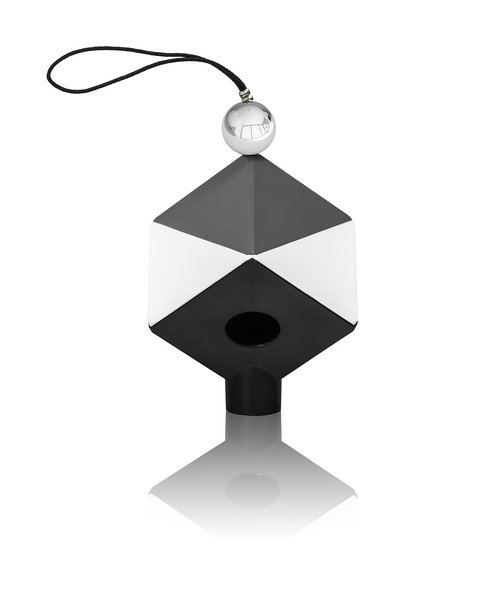
left: SpyderCHECKR | right: SpyderCUBE

Especially when a photographer uses more than one camera, it becomes obvious that the way colors are being displayed has a lot to do with a camera’s characteristics. Adjusting several cameras in a way that the result is an identical color output is hardly possible when done manually and by visual judgment only. On top of that, such a process requires a lot of time and effort. The RAW format however offers a wide range of opportunities and allows for optimal color characteristics due to a plethora of color sliders. That being said, achieving identical color outputs is certainly not a walk in the park, but a bit of patience along with some dedication and the right tool set allow for perfection. A white balance correction is the first important step towards color consistency.

The next step is taking care of correcting individual colors. A color reference is required in order to match different colors. There are different tools available, all of which are so-called targets, analyzing a camera’s way to display colors and finding a way to neutralize it. In this case, we make use of a SpyderCHECKR, offering a plugin for Photoshops’ ACR or Lightroom. Once photographed under each respective lighting condition, this target is utilized as a reference within the software. Just a few clicks, and we are able to create customized settings, which are available in our RAW converting software of choice.

Each camera and each lighting condition requires its own customized correction setting. Our case study shows a mixture of photos taken with a Canon 5D MkII and a Nikon D700. We utilized one customized setting per camera for general daylight, which was applied to all pictures taking during daytime. Please note that this process can certainly be applied to creating consistent colors for photos taken during an event. When reproducing paintings in a museum however, it is important to consider each slight change of ambient light as well as different reflections.

Clearly to see are the different color perceptions of the Nikon and the Canon camera.
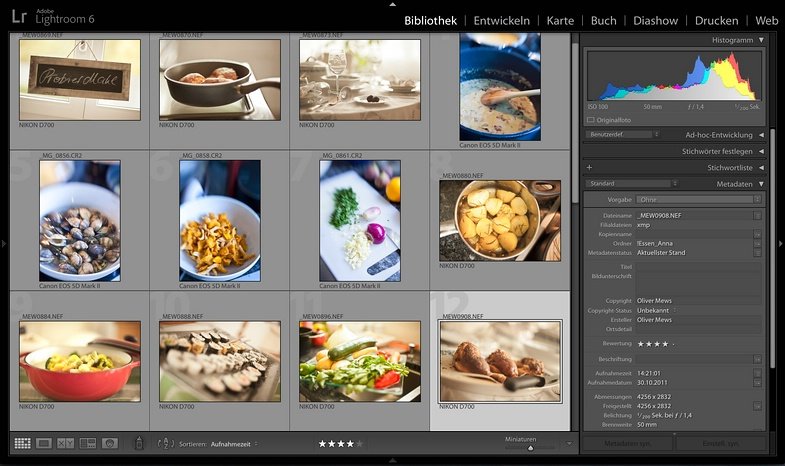
Olis Tips on Color Management #9

By applying the color correction settings generated by reference images shot with the SpysderCHECKR or SpyderCUBE you can match the different light interpretations:
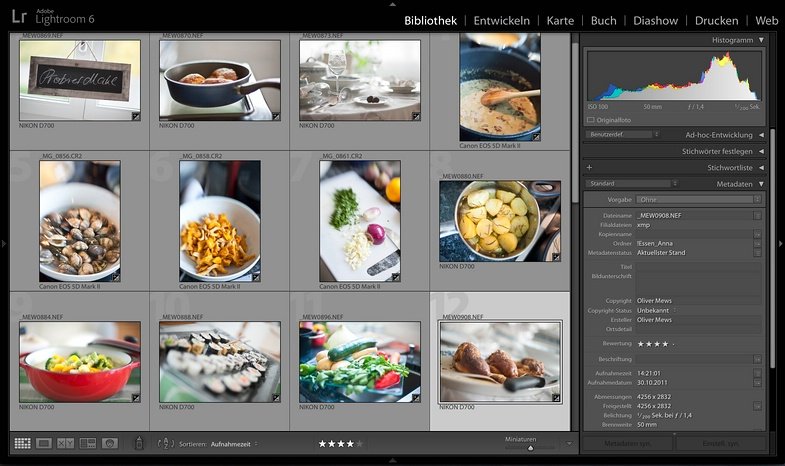
Olis Tips on Color Management #9

This is how you make your way through this process of achieving consistent colors:

  • Photograph the color reference frontally as precisely as possible and make sure to avoid reflections.
  • Prepare the target in your RAW converting software, using the sliders for white balance, lighting and shadows
    • Instead of going for white, use a medium shade of gray as a reference for your white balance. Gray is the better choice, as it doesn’t reflect ambient colors the way white does.
    • Now go ahead and adjust this white reference to a saturation of 90% (RGB 230, 230, 230), using the respective sliders
    • Proceed by adjusting the reference for shadows to a value of 4% (RGB 10, 10, 10), using the slider for blacks.
  • All color references in the chart will now be retrieved by the plugin and thus automatically used as a basis for correction processing.
  • Finally, the software saves a customized setting, containing detailed color corrections.
  • Given the lighting conditions were identical, this customized setting can now be applied with just one click as a color correction on the other photos of this series.

Beitragsnavigation

Olis Tipps und Tricks zum Color Management #9
CULLMANN: neues Blitzgerät CUlight FR 36, neue Varianten für CUlight FR 60 und CUlight RT 500

Über uns

Das Netzwerk Fotografie gehört mit mehr als 135.000 Mitgliedern zu Europas größten Foto-Communities.

Beste Bilder und beste Fotografie sind unsere Passion.

Wichtige Links

Impressum
Datenschutz
Nutzungsbedingungen
Mitgliedschaften
FAQ
Support
Kontakt

Projekte

NF Newsletter
NF Community
NF Testberichte
NF Marktplatz
NF Club
NF Onlineshop
©2004-2023 Netzwerk Fotografie
Datenschutzeinstellungen Datenschutzeinstellungen

Wir nutzen Cookies auf unserer Website. Einige von ihnen sind essenziell, während andere uns helfen, diese Website und Ihre Erfahrung zu verbessern. Wenn Sie unter 16 Jahre alt sind und Ihre Zustimmung zu freiwilligen Diensten geben möchten, müssen Sie Ihre Erziehungsberechtigten um Erlaubnis bitten. Wir verwenden Cookies und andere Technologien auf unserer Website. Einige von ihnen sind essenziell, während andere uns helfen, diese Website und Ihre Erfahrung zu verbessern. Personenbezogene Daten können verarbeitet werden (z. B. IP-Adressen), z. B. für personalisierte Anzeigen und Inhalte oder Anzeigen- und Inhaltsmessung. Weitere Informationen über die Verwendung Ihrer Daten finden Sie in unserer Datenschutzerklärung. Sie können Ihre Auswahl jederzeit unter Einstellungen widerrufen oder anpassen.

Datenschutzeinstellungen

Alle akzeptieren

Speichern

Nur essenzielle Cookies akzeptieren

Individuelle Datenschutzeinstellungen

Cookie-Details Datenschutzerklärung Impressum

Datenschutzeinstellungen Datenschutzeinstellungen

Wenn Sie unter 16 Jahre alt sind und Ihre Zustimmung zu freiwilligen Diensten geben möchten, müssen Sie Ihre Erziehungsberechtigten um Erlaubnis bitten. Wir verwenden Cookies und andere Technologien auf unserer Website. Einige von ihnen sind essenziell, während andere uns helfen, diese Website und Ihre Erfahrung zu verbessern. Personenbezogene Daten können verarbeitet werden (z. B. IP-Adressen), z. B. für personalisierte Anzeigen und Inhalte oder Anzeigen- und Inhaltsmessung. Weitere Informationen über die Verwendung Ihrer Daten finden Sie in unserer Datenschutzerklärung. Hier finden Sie eine Übersicht über alle verwendeten Cookies. Sie können Ihre Einwilligung zu ganzen Kategorien geben oder sich weitere Informationen anzeigen lassen und so nur bestimmte Cookies auswählen.

Alle akzeptieren Speichern Nur essenzielle Cookies akzeptieren

Zurück

Datenschutzeinstellungen

Essenzielle Cookies ermöglichen grundlegende Funktionen und sind für die einwandfreie Funktion der Website erforderlich.

Cookie-Informationen anzeigen Cookie-Informationen ausblenden

Name
AnbieterEigentümer dieser Website, Impressum
ZweckSpeichert die Einstellungen der Besucher, die in der Cookie Box von Borlabs Cookie ausgewählt wurden.
Cookie Nameborlabs-cookie
Cookie Laufzeit1 Jahr

Statistik Cookies erfassen Informationen anonym. Diese Informationen helfen uns zu verstehen, wie unsere Besucher unsere Website nutzen.

Cookie-Informationen anzeigen Cookie-Informationen ausblenden

Akzeptieren
Name
AnbieterNetzwerk Fotografie
ZweckCookie von Matomo für Website-Analysen. Erzeugt statistische Daten darüber, wie der Besucher die Website nutzt.
Datenschutzerklärung https://www.nikon-fotografie.de/datenschutz/
Cookie Name_pk_*.*
Cookie Laufzeit13 Monate

Marketing-Cookies werden von Drittanbietern oder Publishern verwendet, um personalisierte Werbung anzuzeigen. Sie tun dies, indem sie Besucher über Websites hinweg verfolgen.

Cookie-Informationen anzeigen Cookie-Informationen ausblenden

Akzeptieren
Name
AnbieterGoogle Ireland Limited, Gordon House, Barrow Street, Dublin 4, Ireland
ZweckCookie von Google, das für Ad-Targeting und Anzeigenmessung verwendet wird.
Datenschutzerklärung https://policies.google.com/privacy?hl=de
Host(s)doubleclick.net
Cookie NameDSID, IDE
Cookie Laufzeit1 Jahr

Inhalte von Videoplattformen und Social-Media-Plattformen werden standardmäßig blockiert. Wenn Cookies von externen Medien akzeptiert werden, bedarf der Zugriff auf diese Inhalte keiner manuellen Einwilligung mehr.

Cookie-Informationen anzeigen Cookie-Informationen ausblenden

Akzeptieren
Name
AnbieterMeta Platforms Ireland Limited, 4 Grand Canal Square, Dublin 2, Ireland
ZweckWird verwendet, um Facebook-Inhalte zu entsperren.
Datenschutzerklärung https://www.facebook.com/privacy/explanation
Host(s).facebook.com
Akzeptieren
Name
AnbieterGoogle Ireland Limited, Gordon House, Barrow Street, Dublin 4, Ireland
ZweckWird zum Entsperren von Google Maps-Inhalten verwendet.
Datenschutzerklärung https://policies.google.com/privacy
Host(s).google.com
Cookie NameNID
Cookie Laufzeit6 Monate
Akzeptieren
Name
AnbieterMeta Platforms Ireland Limited, 4 Grand Canal Square, Dublin 2, Ireland
ZweckWird verwendet, um Instagram-Inhalte zu entsperren.
Datenschutzerklärung https://www.instagram.com/legal/privacy/
Host(s).instagram.com
Cookie Namepigeon_state
Cookie LaufzeitSitzung
Akzeptieren
Name
AnbieterOpenstreetmap Foundation, St John’s Innovation Centre, Cowley Road, Cambridge CB4 0WS, United Kingdom
ZweckWird verwendet, um OpenStreetMap-Inhalte zu entsperren.
Datenschutzerklärung https://wiki.osmfoundation.org/wiki/Privacy_Policy
Host(s).openstreetmap.org
Cookie Name_osm_location, _osm_session, _osm_totp_token, _osm_welcome, _pk_id., _pk_ref., _pk_ses., qos_token
Cookie Laufzeit1-10 Jahre
Akzeptieren
Name
AnbieterTwitter International Company, One Cumberland Place, Fenian Street, Dublin 2, D02 AX07, Ireland
ZweckWird verwendet, um Twitter-Inhalte zu entsperren.
Datenschutzerklärung https://twitter.com/privacy
Host(s).twimg.com, .twitter.com
Cookie Name__widgetsettings, local_storage_support_test
Cookie LaufzeitUnbegrenzt
Akzeptieren
Name
AnbieterVimeo Inc., 555 West 18th Street, New York, New York 10011, USA
ZweckWird verwendet, um Vimeo-Inhalte zu entsperren.
Datenschutzerklärung https://vimeo.com/privacy
Host(s)player.vimeo.com
Cookie Namevuid
Cookie Laufzeit2 Jahre
Akzeptieren
Name
AnbieterGoogle Ireland Limited, Gordon House, Barrow Street, Dublin 4, Ireland
ZweckWird verwendet, um YouTube-Inhalte zu entsperren.
Datenschutzerklärung https://policies.google.com/privacy
Host(s)google.com
Cookie NameNID
Cookie Laufzeit6 Monate

Borlabs Cookie powered by Borlabs Cookie

Datenschutzerklärung Impressum